You can save searches and items to lists in the Account Portal for future use. You can also review your account details, including your checkouts, holds, fines, and fees. If your library setup supports it, you can also view your reading history.
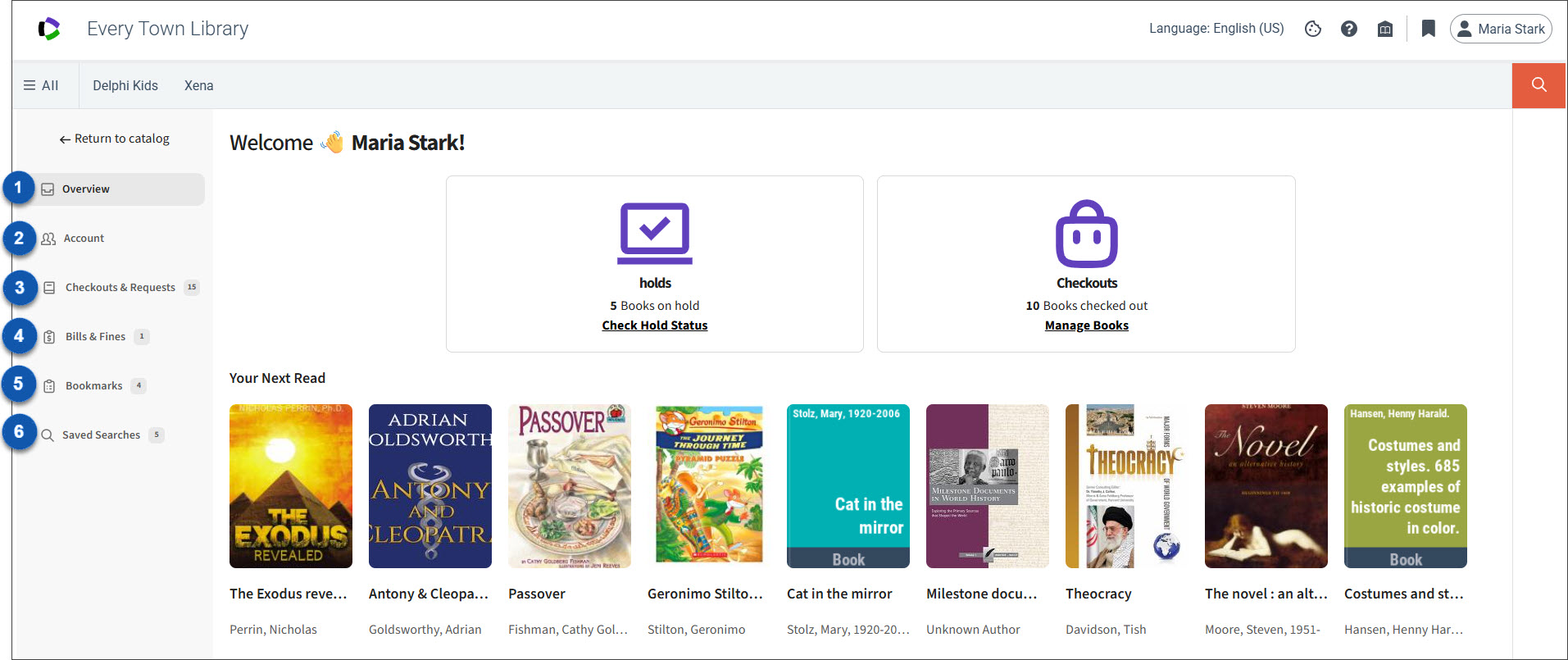
The following image shows the Account Portal.

|
View an at-a-glance summary of your holds and checkouts, including available items from your bookmarked lists and library-promoted content. |

|
Update your account information, opt in or out of reading history, and configure your preferences. You can also link accounts if the feature is enabled by your library. |

|
View your checked-out items, hold requests, and your reading history (if available). |

|
Review and pay fines and fees. |

|
Manage the items you've bookmarked. |

|
Run, update, share, rename, or delete a saved search. |
To use the Account Portal
-
Sign in to Discover.
-
Open the Account Portal
-
In the upper-right section of any page, select your name.
-
Select Account Portal from the menu.
The Overview page is displayed. It provides an at-a-glance view of your holds and checkouts, as well as featured items from your lists or titles selected by your library.
-
-
Perform one or more of the following tasks:
Tab Task Overview
View holds and checkouts
View featured items selected by your library
Account Checkouts & Requests Bills & Fines Pay fines and fees Bookmarks Saved Searches