Report Output Formats
When you set up the report criteria, you also specify the report output file type. For list, count, and statistical report types, you can select the following types:
- Excel
- Text - When you select Text, you can select the delimiter type: Comma and quote, Tab, Semi-colon, Colon, or Pipe.

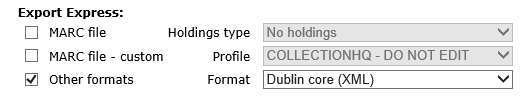
If your library has Export Express in addition to SimplyReports, you can also select the following formats for exporting records from the Item and Bibliographic list reports tabs:
- MARC file - If you select this file type, you select No holdings or Include holdings in the Holdings type box.
- MARC file - custom. If you select this option, you choose a custom export profile in the Profile box. See Using Export Express.
- Other formats - If you select this option, you choose Dublin Core, MARC XML, or LibraryThing
If your library uses Item or Patron history reports, you can specify the following report output types after entering the report criteria and previewing the history:
- Excel
- Word