Calculating, Blocking for, and Displaying Estimated Accrued Fines
Polaris provides the ability to display an estimated fine amount (accrued fines) for overdue items a patron has currently checked out. You can opt to include claimed and/or lost items in the estimate calculation (system level only). The estimated fine amount information is available in the staff client, the PowerPAC and Mobile PAC patron account, and the Polaris ExpressCheck patron account.
In addition, you can choose to block the patron for a threshold amount that is the total of actual fines and accrued fines, not just fines already on the patron account, using the normal fines block functionality (see Fine Limits). If you choose to include accrued fines in blocking calculations, the accrued fines are added to any existing fines in real time and patrons are blocked as appropriate, using the normal fines block. The option to include accrued fines in blocking calculations is available at the system level only. This function applies to all check-out and renewals in Polaris, including staff client check-out and renewal, ExpressCheck check-out and renewal, renewal from PowerPAC or Mobile PAC, telephony renewal, and SIP check-out and renewal.
- Governing library - The calculation of the accrued amount is based on the setting of the governing library for fine calculation, set in the system-level Patron Services parameter Consortium circulation. (If that option is set to Use transacting branch, the calculation is based on the lending branch’s settings.)
Note:
In some lost item scenarios it is possible to have a lost item where the replacement and overdue charges have not been charged. If the Transacting branch (the branch where the item is checked in) has been selected as the governing library for lost item recovery, that branch’s charges would apply when and where the item is finally recovered, which cannot be known in advance. In this case the estimated amount will be based on the loaning branch’s settings.
- Hourly loans - Accrued fines on hourly loans are calculated in real time and added to any actual fines at the time the block is calculated.
- Maximum fine limit - When the total amount is calculated and displayed, the displayed amount will not exceed the maximum fine limit per material type as defined in the Fines policy table, even if the calculated amount is greater. In other words, the patron will not be charged for an amount greater than the maximum fine limit.
- Lost items with overdues - You can opt to include items in the estimated fine calculation that are declared or billed lost but the overdue fine has not been charged. See Set up estimate accrued fine calculations and blocking.
- Claimed items - You can also opt to include claimed items in the estimated fine calculation. See Set up estimate accrued fine calculations and blocking.
- Claimed and lost items in PAC patron account display - The PAC patron account displays claimed and lost items only if the PowerPAC profile (and Mobile PAC profile, if applicable) Navigation: Claimed and Lost is set to Yes for the patron's registered branch. If it is set to No, the patron may be blocked for accrued fines that are not obvious in the patron account display. Many libraries have a lost item limit block and/or a claimed item limit block, and these may block the account before or in addition to the accrued fines block.
- Notification and reporting - The accrued amounts are not included on overdue notices, in the calculation for billing, or in calculations for collection agency reporting.
In summary, accrued fines are calculated for overdue items if the Patron Code/Fine Code Fine Amount definition is greater than $0.00 and any one of the following conditions is true:
- The circulation status is Out and the item is overdue, but the overdue fine is not charged.
- You have opted to included claimed items in the calculation, the item circulation status is Claimed, and the system-level Patron Services parameter Overdues: Charge fines for claimed items is set to Yes. The table summarizes the effects of claimed items settings:
| Include claimed items in accrued fine calculation | Overdues: Charge fines for claimed items | Include in estimated amount calculation and block? |
|---|---|---|
|
Y |
Y |
Y |
|
Y |
N |
N |
|
N |
Y |
N |
|
N |
N |
N |
- You have opted to include lost items in the calculation, the item circulation status is Lost, and the overdue fine has not been charged. The table summarizes the effects of lost items settings:
| Include lost items in accrued fine calculation | Lost items charge options: Charge overdue | Include in estimated amount calculation and block? |
|---|---|---|
|
Y |
Y |
Y |
|
Y |
N |
N |
|
N |
Y |
N |
|
N |
N |
N |
For set-up instructions, see Set up estimate accrued fine calculations and blocking.
Displaying Estimated Fines
Estimated fines are available for display in both the staff client and PAC. (Including accrued fines in blocking calculations is optional and set at the system level. See Set up estimate accrued fine calculations and blocking.)
Staff Client Display
From the Patron Status workform - Items Out view, staff can estimate accrued fines on items that are currently overdue, calculating the fines if the items were returned today or on a date selected from a calendar. If you choose to include lost and/or claimed items in the accrued fine calculation, similar functionality is available from the Patron Status workform - Claims view.
PAC Patron Account Display
In PAC, the patron can estimate accrued fines from the Items Out page, the Fines & Fees page, and the Claimed & Lost page of the patron account. In PowerPAC, the option to estimate overdue fines appears below the list if there are overdue items. The example shows the Items Out page.
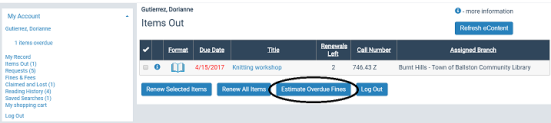
When the patron clicks Estimate Overdue Fines, a light box displays the title, author, item status, due date, and accrued fine for each overdue item, as well as the total due as of the current date. If you have opted to include claimed and/or lost items in the estimate, these are included in the display and calculation.
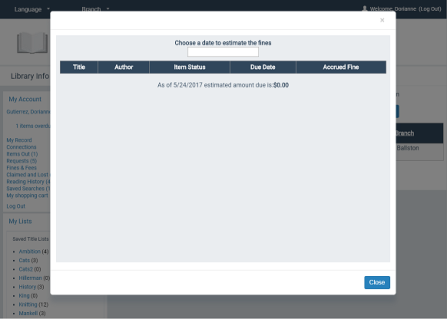
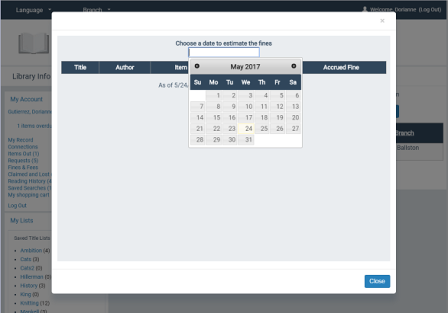
The patron can click the date field to select a different estimation date from a calendar.
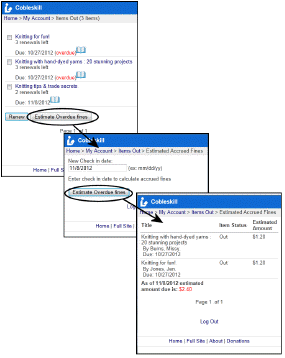
Mobile PAC offers similar features.
If you choose to include accrued fines in the patron blocking calculation, the patron fine block message appears when appropriate in PAC and the patron cannot renew items.
Note:
If the estimated amount includes lost item overdues or claimed items, the patron account is blocked. However, claimed and lost items are only displayed in the PAC patron account if the PowerPAC profile (and Mobile PAC profile, if applicable) Navigation: Claimed and Lost is set to Yes for the patron's registered branch.
ExpressCheck Patron Account Display
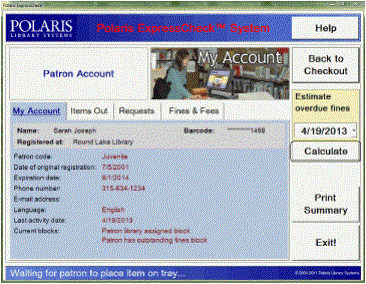
ExpressCheck users can estimate fines using a dashboard control in the patron account. The patron sets the date and clicks Calculate.
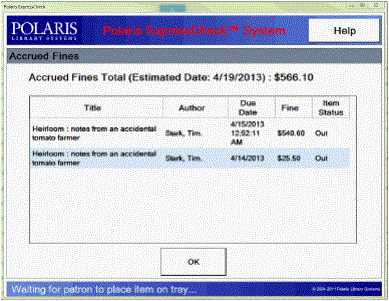
The accrued fines are displayed according to the selected date.
Polaris Phone Attendant (Inbound Telephony)
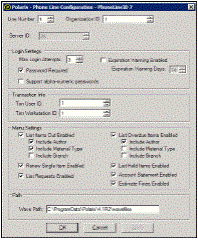
You enable a selection to hear estimated fines at the top-level menu. (If the patron does not have any overdue or claimed items, the option is not available.) When the patron selects this option, the message includes the author, title, due date, and estimated amount for each item, and the total due. To enable this option, select Estimate Fines in the Phone Attendant configuration utility.
If the patron has lost or claimed items and overdue items, an additional message states Additional charges are due for lost or claimed items, please contact the library for more information. If the patron has only lost or claimed items but no overdue items, only the Additional charges message is played.