Setting Up Search Filters (Limit By)
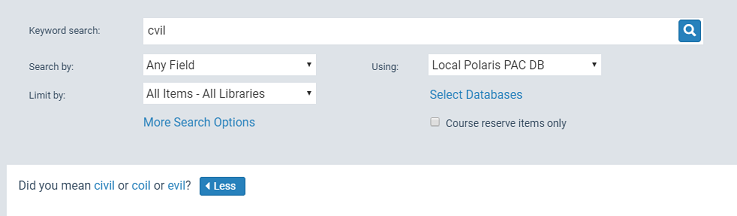
You can set up search filters that PAC users can select to limit search results. PowerPAC users can select a filter before launching a quick, keyword, phrase, exact, or advanced search. For example, a patron can filter a keyword search to return only DVDs. The filters are also available to Mobile PAC users who use the Mobile PAC Advanced search.
Use the PAC Limit by Display policy table to specify the search filters available to PAC users in the Limit by drop-down list, and the order in which the filters are listed. The PAC Limit by Display policy table is available at the system, library, or branch level. The organization level at which the table is opened determines the entries you see in the list, and you can view and change entries for the selected organization only. This table can be displayed with the Administration Explorer.
Note:
These System Administration permissions are required to modify this table: Access administration: Allow; Access tables: Allow; Modify PAC limit by display table: Allow
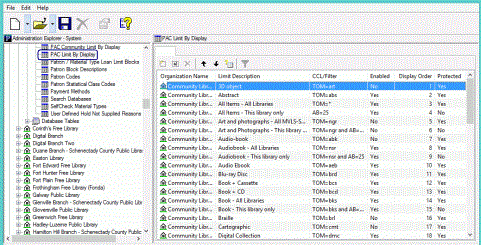
You can include the following types of filters in the Limit by list:
Note:
If a PAC user enters a search term, selects the local database and one or more remote databases, and selects a Limit by option, the Limit by filters will be applied to the remote databases that can support that filter. If the remote database is unable to use the filter, it will be applied only to the local results. Results may be returned from the remote databases using the search string without the filter. If an unsupported filter was removed from a search of a remote database, a message appears in the Search Status box.
- Type of material (TOM) filters - Polaris PowerPAC offers a set of standard formats/types of material and custom search filters in the Limit by list. In the PAC Limit by Display policy table, you can modify the description and the Enabled setting for standard formats/types of materials, but you cannot edit the CQL command for these standard filters. The TOM Limit by filters are used in Z39.50 searches of remote databases, but not in MuseGlobal databases. For MuseGlobal databases, the TOM limiter is discarded because MuseGlobal databases cannot interpret this limiter and would return zero results if this limiter were included in the search.
- Custom filters - Use CQL commands to set up custom filters for the Limit by list. You can combine standard type of material codes with other CQL commands to create custom search filters. See PAC CQL Commands & Access Points.
- Availability filters - You can also use the PAC Limit by Display policy table to set up search filters that limit search results to titles with at least one available linked item. The patron selects the filter in the Limit by list before launching the search. If a PowerPAC or Mobile PAC connection is at the system level, the search results include all titles with at least one available item. If the connection is at the branch level, the results include all titles that have at least one linked available item assigned to that branch or the other branches defined as Local in the branch’s Item Availability Display Order table. (At either level, items with a suppressed circulation status are not included, and items where Display in PAC is not checked in the linked bibliographic record are not included.)
See also: