View Import Jobs in the Queue
To view import jobs in the Import Jobs Queue:
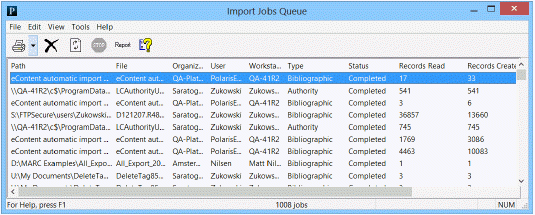
- Select Utilities > Importing > Import Jobs Queue to open the Import Jobs Queue window.
By default, the jobs are sorted by the date and time posted. If multiple files were selected for import, each file appears on a separate line. Completed jobs remain in the queue until an authorized user manually deletes them. Automatic imports for eContent are also listed.
- Click any column heading to sort the list.
Note:
Pending import jobs have been successfully initialized, but the import processing has not yet begun. Blacked out import jobs have been successfully initialized, or may have started running, but import processing is not currently allowed because a system- or user-defined blackout time is in effect. When the blackout time has ended, processing automatically begins or resumes.
- Click the Refresh button or press F5 periodically to refresh the queue and see the most recent import jobs.
Related Information