Cataloging Options on the Shortcut Bar
From the Polaris Shortcut Bar, you can create new cataloging records, find existing records, import or export records, and initiate automatic processing of cataloging records. Specific permissions are required for creating, modifying, deleting, and processing cataloging records. Course Reserves, Community Records, Promotions, Campaigns, and Carousel Toolkit are available if your library has licenses for these products. For information on the permissions required to do cataloging tasks, see Cataloging Permissions.
Tip:
You can also click the blue orb to expand the Cataloging toolbar. Then, click the icons to open the Find Tool and search for existing Cataloging records. For example, click  to search for an existing bibliographic record.
See also:
- Creating New Cataloging Records
- Accessing Existing Cataloging Records
- Start Cataloging Records Processing
Creating New Cataloging Records
Tip:
In the New dialog box, select Cataloging Objects in the View box to list only Cataloging records.
To create a new Cataloging record, select File > New, press CTRL+N or click  . The New dialog box appears. If the record type has templates defined, you can select Existing Template and choose a template to create a new record. If you are creating several records of the same type using the same template, you can select an existing template, and then click Make session default. When you create the next record of the same type, the template you selected will be used. If the record type does not have templates defined, or you want to create a new record without a template, click OK. See Methods for Adding New Records.
Accessing Existing Cataloging Records
Select Cataloging and select a menu option. The Find Tool opens for the selected record type. See Finding Cataloging Records.
Start Cataloging Records Processing
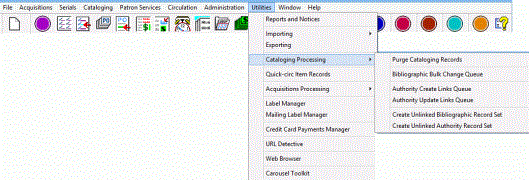
Select Utilities > Cataloging Processing. The Cataloging Processing submenu displays the processing utilities, such as purging cataloging records and managing the bulk change queue. See Cleaning Up the Catalog
Accessing the Carousel Toolkit
If your library has a license for this product, the Carousel Toolkit is available from the Polaris Shortcut Bar. For more information, see Carousel Toolkit.