Modify the Item Create Call Number Hierarchy table
The Item Create Call Number Hierarchy table is set up during Polaris implementation, but you can add and change entries. Each library can specify different tags to use for the call number.
Note:
These permissions are required to view and modify the Item Create Call Number Hierarchy database table: Access administration: Allow; Access tables: Allow; Modify call number hierarchy table: Allow.
To add or change call number entries:
Note:
The call number fields in bibliographic records are copied to their linked item records if the Bring call number fields from bib to item record when link is made profile is set to Yes. See Copy bibliographic call numbers to item records.
In the Administration Explorer tree view, expand the organization’s folder.
Expand the Database Tables folder.
Select Item Create Call Number Hierarchy.
The Item Create Call Number Hierarchy table appears.
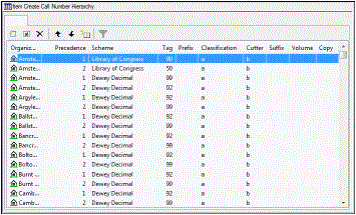
Do one of the following actions:
-
To add an entry, click
 .
. -
To modify an entry, double-click the entry, or select the entry and click
 .
.
The Insert or Modify dialog box appears, depending on your selection.
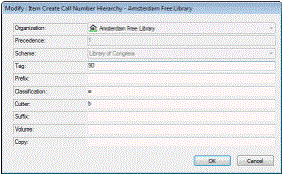
In the Organization box, select the branch for which the call number is used, if it is not already selected.
If you are adding a new entry, select the shelving scheme in the Shelving Scheme box. You cannot change the shelving scheme for existing entries.
In the Bibliographic Tag Number box, type the bibliographic record tag that contains the call number information.
In the Prefix box, type the tag subfield that contains the prefix information.
In the Classification box, type the tag subfield that contains the classification information.
In the Cutter box, type the tag subfield that contains the cutter number.
Note:
Do not enter the subfield delimiters.
In the Suffix box, type the tag subfield that contains the call number suffix.
In the Volume box, type the tag subfield that contains the volume number.
In the Copy box, type the tag subfield that contains the copy number.
Click OK on the dialog box.
Select File > Save.